Cohere 嵌入
提供 Bedrock Cohere 嵌入模型。 将生成式 AI 功能集成到基本应用程序和工作流程中,以改善业务成果。
AWS Bedrock Cohere 模型页面 和 Amazon Bedrock 用户指南 包含有关如何使用 AWS 托管模型的详细信息。
前提条件
请参阅 Spring AI 关于 Amazon Bedrock 的文档 以设置 API 访问。
自动配置
Spring AI 自动配置、starter 模块的构件名称发生了重大变化。 请参阅 升级说明 了解更多信息。
将 spring-ai-starter-model-bedrock 依赖项添加到项目的 Maven pom.xml 文件中:
<dependency>
  <groupId>org.springframework.ai</groupId>
  <artifactId>spring-ai-starter-model-bedrock</artifactId>
</dependency>
或添加到 Gradle build.gradle 构建文件中。
dependencies {
    implementation 'org.springframework.ai:spring-ai-starter-model-bedrock'
}
提示:请参阅 依赖管理 部分,将 Spring AI BOM 添加到您的构建文件中。
启用 Cohere 嵌入支持
默认情况下,Cohere 嵌入模型是禁用的。
要启用它,在应用程序配置中将 spring.ai.model.embedding 属性设置为 bedrock-cohere:
spring.ai.model.embedding=bedrock-cohere或者,您可以使用 Spring 表达式语言(SpEL)引用环境变量:
# 在 application.yml 中
spring:
  ai:
    model:
      embedding: ${AI_MODEL_EMBEDDING}
# 在您的环境或 .env 文件中
export AI_MODEL_EMBEDDING=bedrock-cohere您还可以在启动应用程序时使用 Java 系统属性设置此属性:
java -Dspring.ai.model.embedding=bedrock-cohere -jar your-application.jar嵌入属性
前缀 spring.ai.bedrock.aws 是配置 AWS Bedrock 连接的属性前缀。
| 属性 | 描述 | 默认值 |
|---|---|---|
spring.ai.bedrock.aws.region |
要使用的 AWS 区域。 |
us-east-1 |
spring.ai.bedrock.aws.access-key |
AWS 访问密钥。 |
- |
spring.ai.bedrock.aws.secret-key |
AWS 密钥。 |
- |
嵌入自动配置的启用和禁用现在通过前缀为 spring.ai.model.embedding 的顶级属性进行配置。
要启用,spring.ai.model.embedding=bedrock-cohere(默认启用)
要禁用,spring.ai.model.embedding=none(或任何不匹配 bedrock-cohere 的值)
此更改是为了允许多个模型的配置。
前缀 spring.ai.bedrock.cohere.embedding(在 BedrockCohereEmbeddingProperties 中定义)是配置 Cohere 的嵌入模型实现的属性前缀。
属性 |
描述 |
默认值 |
spring.ai.model.embedding |
启用或禁用 Cohere 支持 |
bedrock-cohere |
spring.ai.bedrock.cohere.embedding.enabled(已移除且不再有效) |
启用或禁用 Cohere 支持 |
false |
spring.ai.bedrock.cohere.embedding.model |
要使用的模型 ID。请参阅 CohereEmbeddingModel 了解支持的模型。 |
cohere.embed-multilingual-v3 |
spring.ai.bedrock.cohere.embedding.options.input-type |
添加特殊标记以区分每种类型。您不应该混合不同的类型,除非是为了搜索和检索而混合类型。在这种情况下,使用 search_document 类型嵌入语料库,使用 search_query 类型嵌入查询。 |
SEARCH_DOCUMENT |
spring.ai.bedrock.cohere.embedding.options.truncate |
指定 API 如何处理超过最大令牌长度的输入。如果您指定 LEFT 或 RIGHT,模型将丢弃输入,直到剩余输入正好是模型的最大输入令牌长度。 |
NONE |
注意:通过 Amazon Bedrock 访问 Cohere 时,截断功能不可用。这是 Amazon Bedrock 的问题。Spring AI 类 BedrockCohereEmbeddingModel 将截断到 2048 字符长度,这是模型支持的最大长度。
请查看 CohereEmbeddingModel 了解其他模型 ID。
支持的值有:cohere.embed-multilingual-v3 和 cohere.embed-english-v3。
模型 ID 值也可以在 AWS Bedrock 基础模型 ID 文档 中找到。
提示:所有以 spring.ai.bedrock.cohere.embedding.options 为前缀的属性都可以通过在 EmbeddingRequest 调用中添加请求特定的 运行时选项 在运行时被覆盖。
运行时选项
BedrockCohereEmbeddingOptions.java 提供模型配置,如 input-type 或 truncate。
在启动时,可以使用 BedrockCohereEmbeddingModel(api, options) 构造函数或 spring.ai.bedrock.cohere.embedding.options.* 属性配置默认选项。
在运行时,您可以通过在 EmbeddingRequest 调用中添加新的、请求特定的选项来覆盖默认选项。
例如,为特定请求覆盖默认输入类型:
EmbeddingResponse embeddingResponse = embeddingModel.call(
    new EmbeddingRequest(List.of("Hello World", "World is big and salvation is near"),
        BedrockCohereEmbeddingOptions.builder()
        	.withInputType(InputType.SEARCH_DOCUMENT)
        .build()));
示例控制器
创建 一个新的 Spring Boot 项目,并将 spring-ai-starter-model-bedrock 添加到您的 pom(或 gradle)依赖项中。
在 src/main/resources 目录下添加 application.properties 文件,以启用和配置 Cohere 嵌入模型:
spring.ai.bedrock.aws.region=eu-central-1
spring.ai.bedrock.aws.access-key=${AWS_ACCESS_KEY_ID}
spring.ai.bedrock.aws.secret-key=${AWS_SECRET_ACCESS_KEY}

spring.ai.model.embedding=bedrock-cohere
spring.ai.bedrock.cohere.embedding.options.input-type=search-document
提示:用您的 AWS 凭据替换 regions、access-key 和 secret-key。
这将创建一个 BedrockCohereEmbeddingModel 实现,您可以将其注入到您的类中。
以下是一个使用聊天模型进行文本生成的简单 @Controller 类示例。
@RestController
public class EmbeddingController {

    private final EmbeddingModel embeddingModel;

    @Autowired
    public EmbeddingController(EmbeddingModel embeddingModel) {
        this.embeddingModel = embeddingModel;
    }

    @GetMapping("/ai/embedding")
    public Map embed(@RequestParam(value = "message", defaultValue = "Tell me a joke") String message) {
        EmbeddingResponse embeddingResponse = this.embeddingModel.embedForResponse(List.of(message));
        return Map.of("embedding", embeddingResponse);
    }
}
手动配置
BedrockCohereEmbeddingModel 实现了 EmbeddingModel 并使用 低级 CohereEmbeddingBedrockApi 客户端 连接到 Bedrock Cohere 服务。
将 spring-ai-bedrock 依赖项添加到项目的 Maven pom.xml 文件中:
<dependency>
    <groupId>org.springframework.ai</groupId>
    <artifactId>spring-ai-bedrock</artifactId>
</dependency>
或添加到 Gradle build.gradle 构建文件中。
dependencies {
    implementation 'org.springframework.ai:spring-ai-bedrock'
}
提示:请参阅 依赖管理 部分,将 Spring AI BOM 添加到您的构建文件中。
接下来,创建一个 BedrockCohereEmbeddingModel 并使用它进行文本嵌入:
var cohereEmbeddingApi =new CohereEmbeddingBedrockApi(
		CohereEmbeddingModel.COHERE_EMBED_MULTILINGUAL_V1.id(),
		EnvironmentVariableCredentialsProvider.create(), Region.US_EAST_1.id(), new ObjectMapper());


var embeddingModel = new BedrockCohereEmbeddingModel(this.cohereEmbeddingApi);

EmbeddingResponse embeddingResponse = this.embeddingModel
	.embedForResponse(List.of("Hello World", "World is big and salvation is near"));
低级 CohereEmbeddingBedrockApi 客户端
CohereEmbeddingBedrockApi 提供了基于 AWS Bedrock Cohere Command 模型 的轻量级 Java 客户端。
以下类图说明了 CohereEmbeddingBedrockApi 接口和构建块:
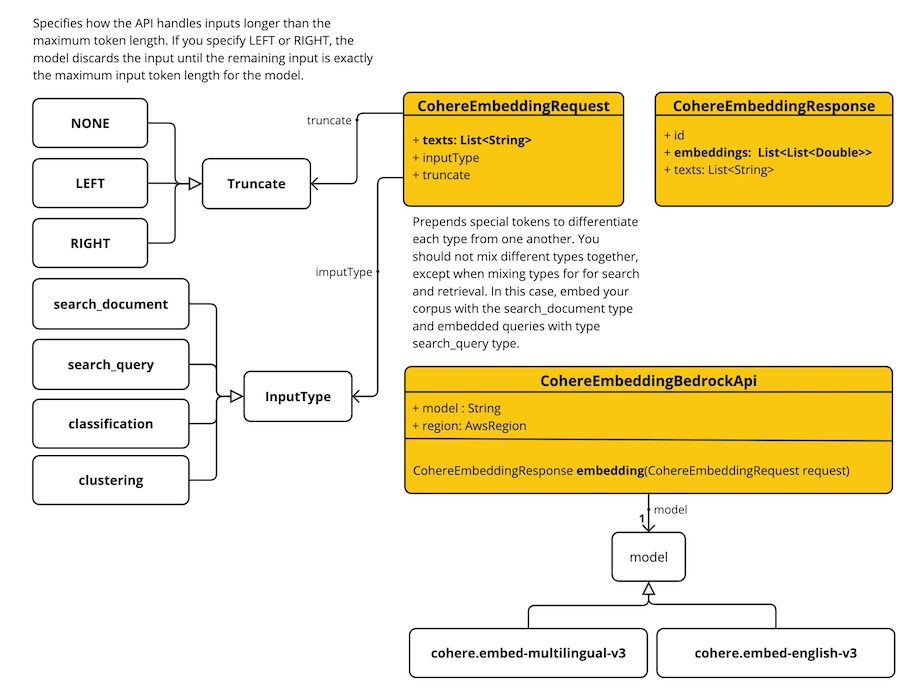
CohereEmbeddingBedrockApi 支持 cohere.embed-english-v3 和 cohere.embed-multilingual-v3 模型,用于单个和批量嵌入计算。
以下是使用 API 的简单代码片段:
CohereEmbeddingBedrockApi api = new CohereEmbeddingBedrockApi(
		CohereEmbeddingModel.COHERE_EMBED_MULTILINGUAL_V1.id(),
		EnvironmentVariableCredentialsProvider.create(),
		Region.US_EAST_1.id(), new ObjectMapper());

CohereEmbeddingRequest request = new CohereEmbeddingRequest(
		List.of("I like to eat apples", "I like to eat oranges"),
		CohereEmbeddingRequest.InputType.search_document,
		CohereEmbeddingRequest.Truncate.NONE);

CohereEmbeddingResponse response = this.api.embedding(this.request);
